
Every buggy on the property, written down — and dispatch reads it before it sends one.
Most software sold as fleet management watches the vehicle: where it is, what its battery is doing, when it’s due for service. This is the other record — what each buggy is, what it seats, and whether it’s in service right now — and it’s the one the dispatcher reads while a guest is waiting.
What a dispatch-facing register holds
Six facts per vehicle, and not one of them needs a sensor. Seats, service status and who is on shift are read by dispatch itself — a party of six is never offered a four-seat cart, and a buggy in maintenance is never sent. Class and wheelchair suitability are recorded for the person deciding, not read by the automatic dispatch.
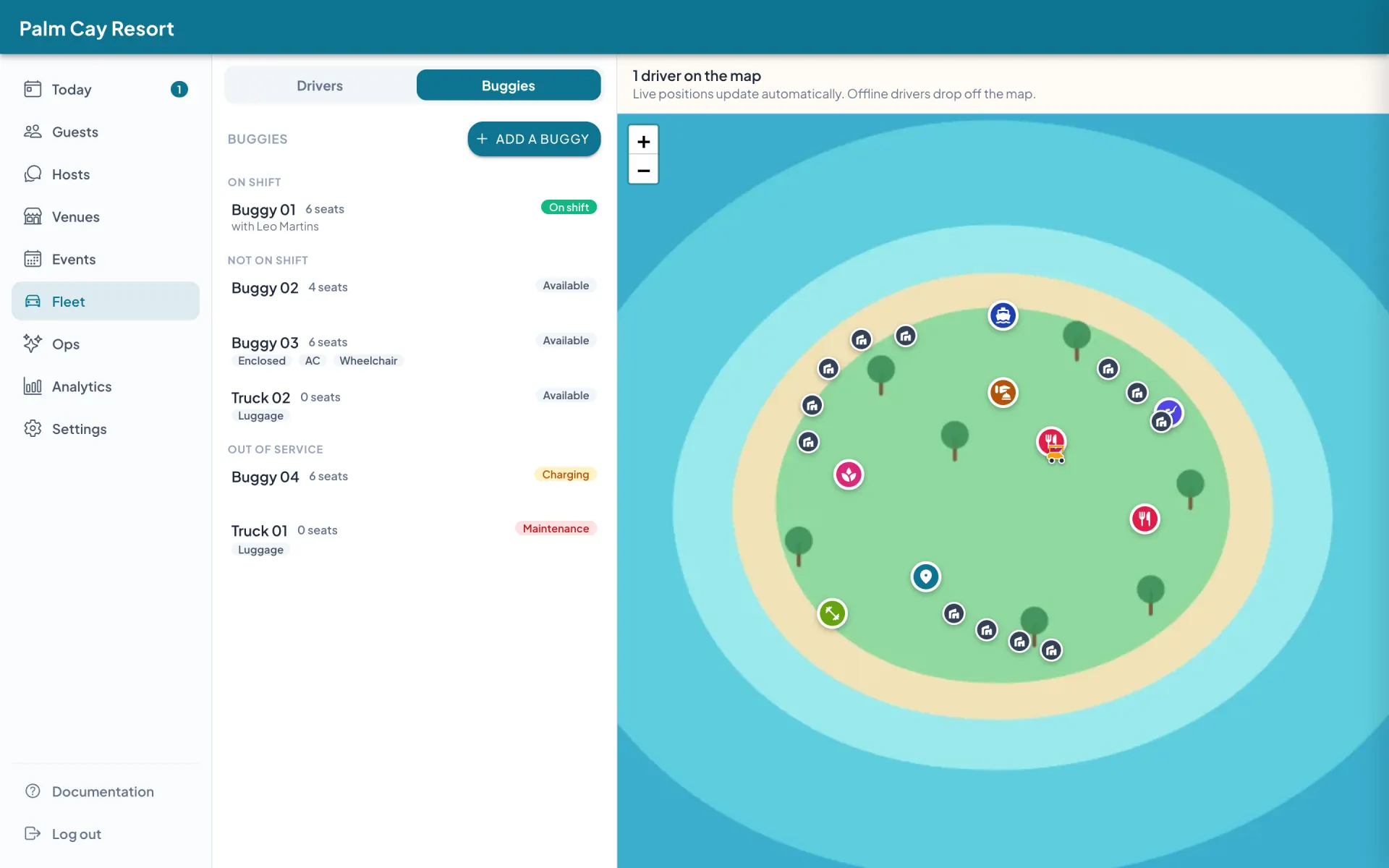
Six vehicles on one property: one on shift, three available, one charging, one in maintenance. The chips record what each one is — enclosed, air-conditioned, wheelchair-suitable, luggage.
A name your team already says
“Buggy 07” — the same call-sign used on the radio, so the register and the handover briefing agree.
How many guests it seats
Guest seats, with the driver’s seat excluded. A party of six is never sent a four-seat cart, at any point in the day.
Open, enclosed, air-conditioned
Recorded on the fleet screen, so the person deciding knows which cart suits a guest in the rain, or a spa transfer at noon.
Wheelchair-suitable — or not recorded
Three states, not two. “Not recorded” is never read as a yes, and never as a no.
What’s in service right now
Available, charging, in maintenance, or retired. A cart marked in maintenance is not offered rides.
Who is on shift in it
A driver signs on to a buggy at the start of a shift, and the arriving driver can take it over at handover.
There are two fleet records: the one you read, and the one dispatch reads
A telematics box writes a record a manager reads afterwards — where the cart went, what the battery did, how many hours it ran, whether it crossed a boundary. That record is genuinely useful, and it answers questions about vehicles.
A register writes a record the software consults while a guest is standing at a villa gate — how many seats, whether it’s enclosed, whether it’s in service, who is on shift in it. That record answers a question about the next twenty minutes. It is the boring half of this category, and it is the half that decides whether the other half applies to you at all.
What a telematics box records
- Where the cart is, on a live map
- State of charge, and charge cycles
- Hours of use, for service intervals
- Geofence crossings and speed near the clubhouse
What the register records
- What each buggy is, and what it seats
- Enclosed, air-conditioned, wheelchair-suitable
- Available, charging, in maintenance, retired
- Which driver is on shift in which buggy, right now
What it changes at 06:38, and at 07:41
06:38 — a driver goes on shift
Aminath opens the driver app. It remembers the buggy she signed on to last time on that handset, so the row already reads Buggy 07 — one tap and she’s online, in a named buggy, and the ride that was already waiting is hers. Where Buggy 07 carries a start check, the walk-round comes first — no ride reaches her until it is sent.
At 14:00 the day driver arrives for a buggy the night driver never signed out of. He taps Take over, and the register stops being wrong for the rest of the afternoon. It’s refused while that driver still has a ride in progress — a handover shouldn’t strand a guest mid-journey.
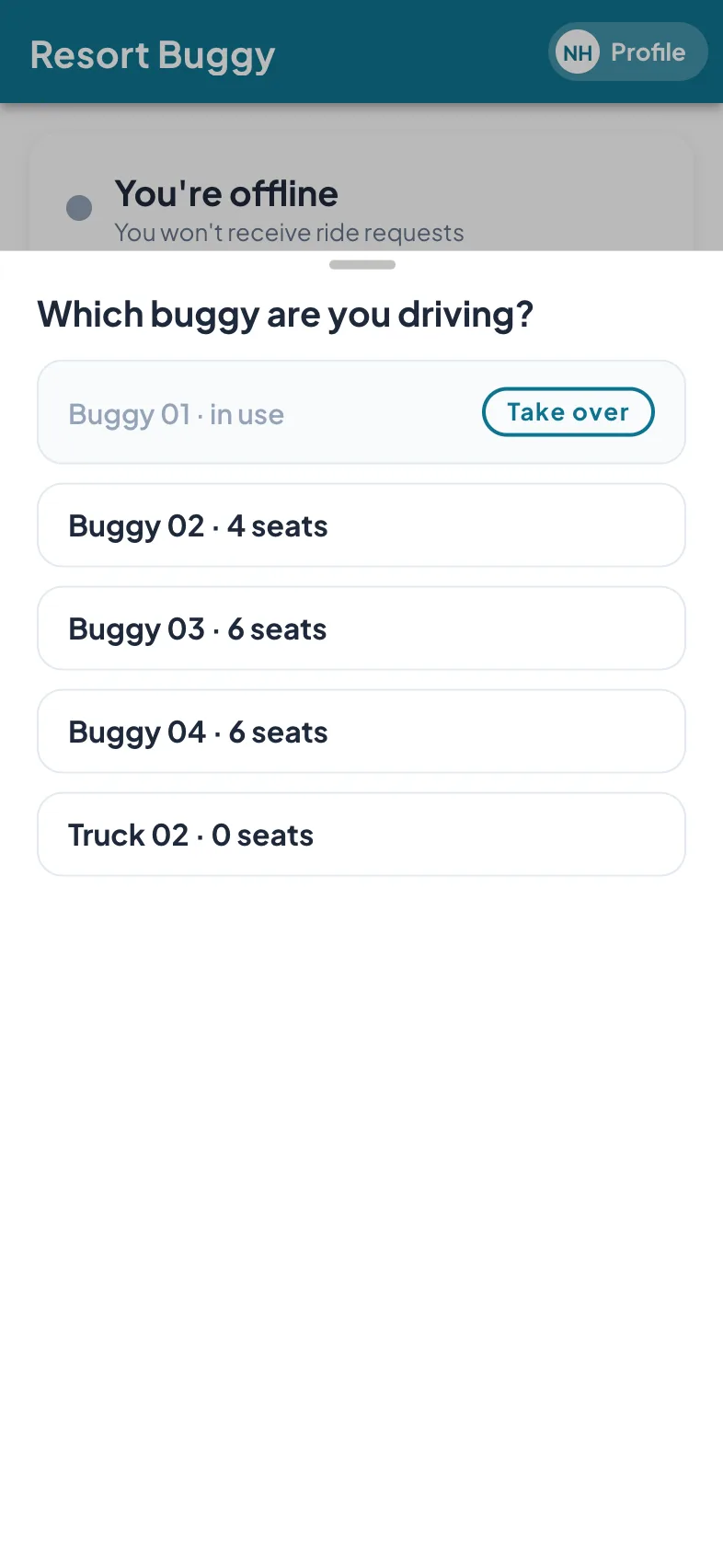
Five vehicles on the list — four buggies and a luggage truck. Buggy 01 is already in use, with Take over beside it.
07:41 — the front desk sends a named buggy
A villa’s guests are landing and the GM wants a specific cart for them. The duty manager presses Assign and picks it by name. The carts that can’t take this ride say why, in line — so she doesn’t have to remember which one seats four.
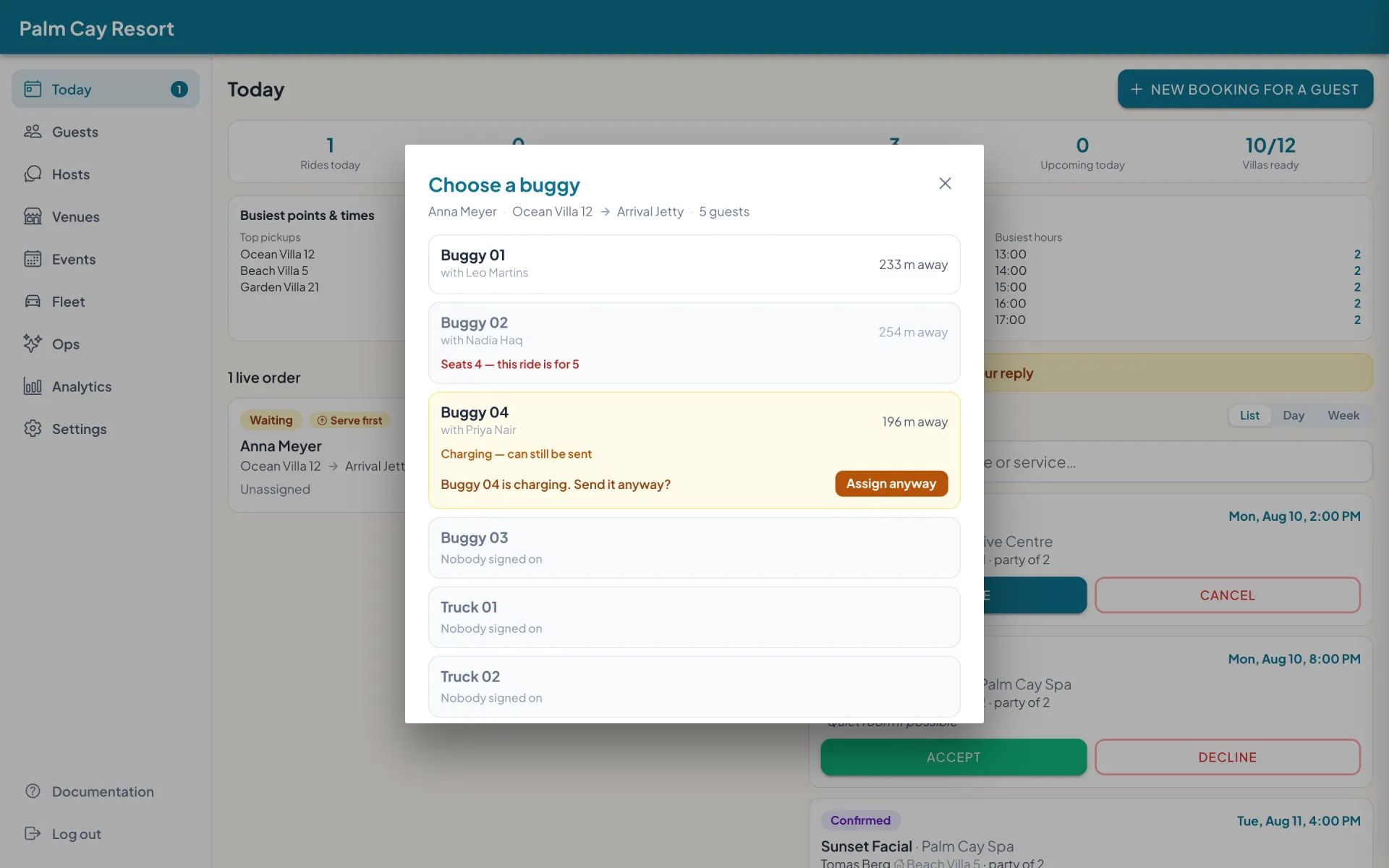
Sending a named buggy to a five-guest arrival. Buggy 02 is refused in line — four seats, and this ride is for five. Buggy 04 is charging, and can still be sent after a confirmation.
Which half of the category this is
This is the dispatch half, and everything in the register is recorded by a person and read by dispatch. Every buggy with a driver signed on is visible on the live map, with the position coming from the driver’s phone. Battery telemetry, GPS units inside the carts and geofencing are the telematics half — fitted as hardware, priced per cart.
“Charging” and “in maintenance” are what a person set. Servicing runs off the kilometres a driver types at the end of a shift: set an interval in kilometres or days and the cart’s own row turns red when it is due, with nothing fitted to the cart. Reporting covers both the rides — how busy you were, and where — and the work each cart and each driver did.
A resort can point each buggy at its own start and end checklist, with one resort-wide default — the lists are the resort’s own, and a driver reads them in his own language. He walks round the buggy at sign-on, answers each line Fine or Problem with a photo and the dash reading, and no ride reaches him until the start check is sent. The same happens in reverse at the end of the shift, and an end check finished with no signal waits on the phone and sends itself. A shift that ends without him — a flat phone, the desk freeing the buggy — records the end check as missed under his name; the buggy stays usable, and a failed line raises the repair job with the photo attached.
The live board carries what a driver declares from the ride: I’m waiting at the pickup, with the clock running from his arrival; stopped by guests on a path, with a running clock on the row and any note he adds; and a guest who flags him down recorded as a walk-up ride, so the board shows the truth and the ride counts for his buggy. On the same card he types a note for the front desk in his own language, read afterwards on the ride’s record and in the rides export — and the front desk writes to a driver and he answers, so a ride handed on comes with a reason instead of a bare notice.
Keeping a register is optional, and it is per property. Dispatch runs exactly as it does today until you set the register up and write your buggies down. When you do, the only thing that changes for a guest is that their screen names the buggy to look for. If you’re still mapping the category, what to ask a fleet-management vendor walks through the six capabilities and the questions that separate them.
Who should buy what
Three profiles. One of them is ours.
Your actual problem
Carts leaving the property, theft in the off-season, batteries dying mid-round, service intervals you can’t track
What to buy
A GPS and telematics suite, with hardware fitted in every cart
Telematics
It watches the vehicle itself: where it went, what the battery did, when service is due.
Your actual problem
Guests waiting with no ETA, a front desk relaying ride requests by radio, no record of which cart is which or what each one can carry
What to buy
On-demand dispatch with a vehicle register
Dispatch
This is the half of the category we build, and there is no per-cart hardware in it.
Your actual problem
Both — a resort with its own course
What to buy
Two systems, evaluated separately
Both
Don’t let either vendor sell you the other half as an afterthought.
If you landed in the second row, the rest of the system is worth a look: buggy reservation software covers how guests request and reserve rides, and the audience pages go deeper for resorts running a guest-service fleet and golf clubs running a cart fleet. Costs are on the per-key pricing and the free pilot page.
Common questions
What’s the best fleet management software for golf carts?
Does Resort Buggy track cart location or battery level?
Can I record which carts are out of service?
Does it cover low-speed vehicles as well as golf carts?
Do I need to buy hardware for each cart?
Can guests see which buggy is coming for them?
Does it report usage per cart?
Do I have to keep a register to use the dispatch?
See your own fleet on the board.
A 20-minute walkthrough on your property's map — the register, the shift handover, and sending a named buggy, live.